
Side Brain / Audio Effect Rack
Kick EQer
Shape a kick by ear with eight macros mapped to useful frequency bands. Add character and help it sit in the mix without reaching for individual EQ bands.
An Ableton Live installation that includes EQ Eight. View requirements ↓
Looking for more tools? Explore Composition Power Tools ↗

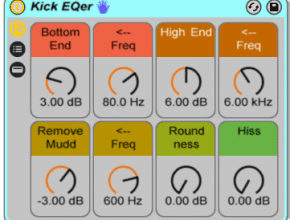
Simple controls for your kick
01
Eight mapped macros
Frequency bands are named and color-coded for quick adjustments.
02
One EQ Eight
A lightweight rack built around a single EQ device.
03
Listen as you shape
Boost or reduce useful ranges to fit the rest of your mix.
Before you download
- An Ableton Live installation that includes EQ Eight.
- Check the download's compatibility with your Live version before purchasing; the original page does not specify a minimum version.
Ableton Live and any separately required third-party software are not included.
Install in Live
- Install any required packs or plug-ins listed here first.
- Double-click the downloaded rack file to open it in Ableton Live.
- Click the rack’s Save button to keep it in your User Library.
Get Kick EQer
See the current price and download options on Gumroad.
gotta say it, non homo, but love this start up help wit all these free racks, EQer(s), ect. really opens up the hirizons yu know..thanx guys, thanx for helping the future make music..the right way (^>^)b
#upthumbs#alltheway
Thanks man glad you like it.