
Side Brain / Drum Rack / Sequencing & Effects
Drum Rack Glitcher
Create randomized rhythmic patterns from your drum sounds, then push them into repeats, tape delays, grain textures, and drones.
Ableton Live Suite 10.1.15 or later. View requirements ↓
Already own Composition Power Tools? This download is included. Check your bundle downloads before purchasing separately.
Hear it in action
Take the pattern further
Repeats On/Off
Add repetition alongside the randomized sequencing.
Pitch Decay
Add a pitch drop to the repeats.
Heavy Glitch
Push the sound through extremely fast beat repeats.
Time Glitch
Add randomized stereo tape delay.
Noise
Transform the sound into a noise texture.
Grains
Add a higher-octave grain delay.
Drone
Blend into a distorted drone.
↑ Note
Set the drone's root note.
Before you download
- Ableton Live Suite 10.1.15 or later.
Ableton Live and any separately required third-party software are not included.
Install in Live
- Install any required packs or plug-ins listed here first.
- Double-click the downloaded rack file to open it in Ableton Live.
- Click the rack’s Save button to keep it in your User Library.
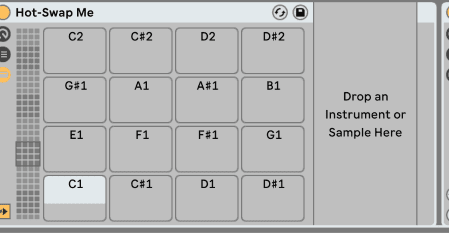
- Hot-swap the Drum Rack for your own kit or an Ableton kit.
- Create a MIDI clip containing the sounds you want to play, then launch it to start the randomized patterns.
Get Drum Rack Glitcher
See the current price and download options on Gumroad.
How do I download this??
thank you