
Side Brain / Audio Effect Rack
Ableton Mixing Rack
Bring EQ, compression, saturation, stereo balance, reverb, and delay into one mixing rack. Shape tracks from Push or directly in Live.
Live 11 version: Ableton Live Suite 11.0.6 or later. View requirements ↓
Already own Composition Power Tools? This download is included. Check your bundle downloads before purchasing separately.

Hear it in action
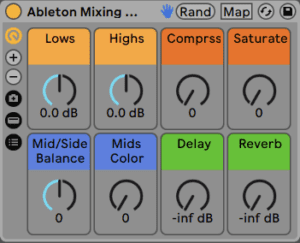
The mix essentials in eight macros
Lows
Adjust a low shelf using Channel EQ.
Highs
Adjust a high shelf using Channel EQ.
Compress
Control Glue Compressor threshold and makeup gain together. Watch your output level.
Saturate
Move from analog clipping into parallel saturation.
Mid/Side Balance
Balance mono and stereo information using Utility. A mono source can go silent at the fully-side position.
Mids Color
Shape isolated mid frequencies with different EQ curves.
Delay
Blend a parallel Echo preset.
Reverb
Blend a parallel Hybrid Reverb preset.
Working with mono sources
If a source has no side information, turning Mid/Side Balance fully toward the sides can silence it. Add a stereo delay or reverb before the rack if you want to create stereo information first.
Before you download
- Live 11 version: Ableton Live Suite 11.0.6 or later.
- Separate Live 10 version: Ableton Live Suite 10.1.35 or later.
- Push is optional.
Ableton Live and any separately required third-party software are not included.
Install in Live
- Install any required packs or plug-ins listed here first.
- Double-click the downloaded rack file to open it in Ableton Live.
- Click the rack’s Save button to keep it in your User Library.
Get Ableton Mixing Rack
See the current price and download options on Gumroad.
nice work on what you’ve done with the mixing rack.
Thank you glad you like!