
Side Brain
  • Ableton Stuff
    • Max for Live
    • Live Extensions
    • Preset Packs
    • Sample Packs
    • Premium Racks
    • Guides
    • Freebies
    • Genre Based Workshops
  • Push Tutorials
  • Study Group
  • The Vault
Select Page

Free Max for Live device

FIND THE KEY
STAY IN TUNE

Live Key finds the key of your samples and incoming audio. Transpose supported samples and clips to your chosen key, or automatically set Ableton Live’s global scale from the detected result.

  • Fast key detection
  • Automatic transposition
  • Follow or set Live’s scale

Get Live Key free

We couldn’t submit your request. Please try again in a moment.
Almost there! Check your inbox to confirm your subscription and get Live Key. If you don’t see the email, check your spam or promotions folder.
Already subscribed? Email me a fresh download link.
Key + scale detection
Simpler, Sampler + Drum Sampler
Audio clips + live input
Auto Transpose + Cents Tuning
Auto-set Live Scale
Hepta + Penta
Session + Arrangement
Auto-Clip Renaming

Seamless Workflow

Know what you’re hearing

01

Detect

Load a sample into Simpler, trigger Sampler or Drum Sampler, or play audio through the track. Live Key estimates a Major or Minor key, or a root note for single-note material.

02

Choose

Pick a target root and Major or Minor scale, or enable Follow Live’s Scale to use Live’s current key as your tuning target.

03

Tune

Turn TUNE on to transpose supported samples and clips, with cents correction when available. The detected key stays visible; Tuned to shows the result and semitone shift.

Scale control + everyday tools

Follow Live
or let Live follow your sample

Auto-set Live Scale Turn it on in Settings to send each completed Major/Minor detection to Live’s global scale and enable Scale Mode. This mode sets Live’s scale without retuning the audio.
Hepta + Penta Choose Hepta for Major or Minor, or Penta for Major Pentatonic or Minor Pentatonic. The detected tonic stays the same. These options replace the tuning controls while Auto-set is on.
Follow Live’s Scale With Auto-set off, enable Follow Live and TUNE to transpose supported sources to Live’s selected key. Relative Major/Minor matching preserves the source’s chord quality.
Your preferred view Switch between Wheel and Text, with Key or Camelot labels. New instances remember your last chosen view; saved devices keep their saved view.
Auto-Clip Renaming Optionally add the key or Camelot code to the beginning or end of the analyzed audio clip’s name. Labels follow the tuned result when TUNE is active.
Read the result See confidence, relative keys and a possible alternative when results are close. Keep a result locked while tuning, or click Analyze to take a fresh measurement.

One device, multiple sources

Place it where the sound is

Simpler Detect newly loaded samples and respond to pitch changes.
Sampler Play a note, phrase or loop and analyze Sampler’s audible output, including its playback pitch.
Drum Sampler Find the key of melodic hits, bass notes, chords, and tonal percussion.
Audio Clips Detect and transpose playing audio clips in Session or Arrangement View, then keep the result locked.
Live Input Analyze incoming instruments, vocals or routed audio. External live input is detection-only; Live Key does not directly retune that signal.
Other Devices Place Live Key after Looper or another audio-producing device. Analysis works on its output; retuning requires a supported sampler or audio-clip pitch target.

Free download

Every idea, in key

Get Live Key, the PDF guide, and future Side Brain device updates through the newsletter.
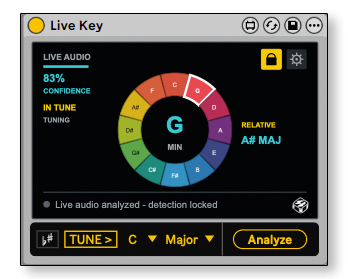
Live Key Max for Live device detecting D-sharp minor from Drum Sampler
Live Key image could not be loaded.

Sign Up

Get Live Key →
Designed for Ableton by Side Brain
Side Brain
The VaultCreative toolsFind my workshopsContact
© 2026 Side Brain. All rights reserved.
Terms & conditions

Cart 0 Items

* Add any 5 workshop recordings to your cart to see the discount.

Your cart is currently empty.

  • Sub Total $0.00
  • Total $0.00
Cart Checkout