
Side Brain / Audio Effect Rack
Cymbal EQer
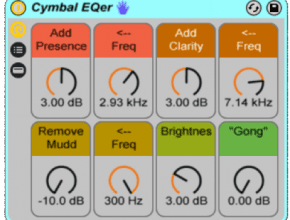
Shape hats, rides, crashes, and splashes with eight macros built around EQ Eight. Adjust their tone while listening to how they fit the rest of the track.
An Ableton Live installation that includes EQ Eight. View requirements ↓
Looking for more tools? Explore Composition Power Tools ↗
Find the right cymbal tone
01
Eight mapped macros
Named, color-coded controls for useful cymbal frequency ranges.
02
Your whole cymbal kit
Use it on hats, rides, crashes, and splashes.
03
One EQ Eight
A focused rack with the EQ settings available inside.
Before you download
- An Ableton Live installation that includes EQ Eight.
- Check the download's compatibility with your Live version before purchasing; the original page does not specify a minimum version.
Ableton Live and any separately required third-party software are not included.
Install in Live
- Install any required packs or plug-ins listed here first.
- Double-click the downloaded rack file to open it in Ableton Live.
- Click the rack’s Save button to keep it in your User Library.
Get Cymbal EQer
See the current price and download options on Gumroad.
so no luck for people without creditcards?
You can put 0 in the amount and you will only have to put your email.
Wow that was strange. I just wrote an very long comment but after I clicked submit my comment didn’t appear.
Grrrr… well I’m not writing all that over again. Anyhow, just wanted to
say wonderful blog!
My blog post: Google