
Side Brain / Audio Effect Rack
Drum Booster 2
Add weight, drive, space, and groove to a drum bus. The Live 12 version brings the processing together using only Ableton Suite's built-in effects.
Live 12 version: an up-to-date Ableton Live Suite 12 installation. No third-party clipping plug-in is needed. View requirements ↓
Already own Composition Power Tools? This download is included. Check your bundle downloads before purchasing separately.

Hear it in action
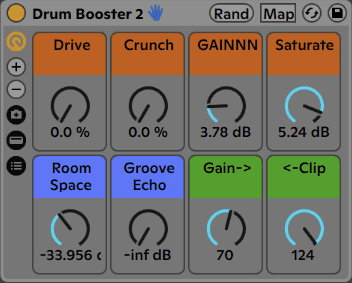
Shape the whole drum bus
Drive
Add waveshaping distortion from Drum Buss.
Crunch
Add distortion to the mids and highs.
GAINNN
Drive Glue Compressor makeup gain into the clipping stages.
Saturate
Add analog drive before final clipping.
Room Space
Blend plate reverb for drums.
Groove Echo
Add syncopated quarter-note echoes.
Gain →
Set the gain going into the clipper.
← Clip
Adjust the final clipping threshold.
Using the Live 10 or 11 version
The earlier versions require an external clipping plug-in. Contact info@sidebrain.net to confirm the correct plug-in and format for your rack file and computer before purchasing an older-version setup.
Before you download
- Live 12 version: an up-to-date Ableton Live Suite 12 installation. No third-party clipping plug-in is needed.
- Older versions: Ableton Live Suite 10.1.43 or later, or Suite 11.0.12 or later, plus the clipping plug-in required by that rack version.
Ableton Live and any separately required third-party software are not included.
Install in Live
- Install any required packs or plug-ins listed here first.
- Double-click the downloaded rack file to open it in Ableton Live.
- Click the rack’s Save button to keep it in your User Library.
Get Drum Booster 2
See the current price and download options on Gumroad.