
Side Brain / Instrument & MIDI Racks
Techno Chord Runs
Break chords into driving, complementary rhythms. Perform with the included synth and bass, or use the MIDI-only rack with your own instrument.
Ableton Live Suite 11.1.1 or later. View requirements ↓
Already own Composition Power Tools? This download is included. Check your bundle downloads before purchasing separately.
Hear it in action
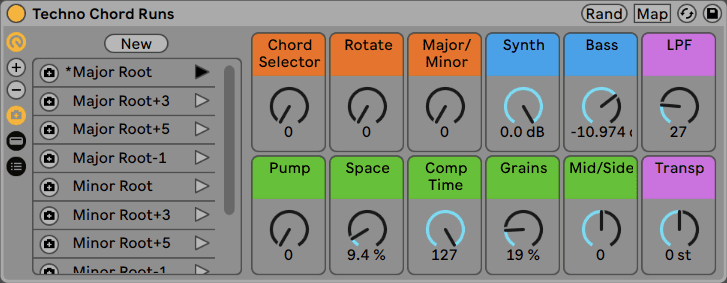
Control the sequence and sound
Chord Selector
Choose root, third, fifth, and seventh chord options.
Rotate
Rotate note sequencing between four options.
Major/Minor
Switch between major, minor, and suspended chord types.
Synth
Set the synth instrument's level.
Bass
Set the bass instrument's level.
LFP
Control the low-pass filters for the synths.
Pump
Create a pumping effect with Auto Pan.
Space
Adjust the reverb dry/wet balance.
Comp Time
Adjust multiband compression timing for a more compressed or plucky sound.
Grains
Add a higher-pitched layer with Grain Delay.
Mid/Side
Balance the mono and stereo information.
Transp
Transpose the entire chord in semitones.
Two racks, plus Macro Snapshots
The download includes a full instrument rack with synth and bass, plus a MIDI-only sequencer rack for use with another instrument. Macro Snapshots give quick access to different chord types. The demo also covers capturing the performance as a MIDI clip.
Before you download
- Ableton Live Suite 11.1.1 or later.
- Rotating Rhythm Generator from CV Tools.
- Poli and Bass from Creative Extensions.
Ableton Live and any separately required third-party software are not included.
Install in Live
- Install any required packs or plug-ins listed here first.
- Double-click the downloaded rack file to open it in Ableton Live.
- Click the rack’s Save button to keep it in your User Library.
Get Techno Chord Runs
See the current price and download options on Gumroad.