
Side Brain / Audio Effect Rack / Return Track
Techno Maker
Turn your kick into techno chords. Load the rack on a return track and use your kick's send to explore thick chords and pitched percussion.
Ableton Live Suite 9.6.1 or later. View requirements ↓
Looking for more tools? Explore Composition Power Tools ↗
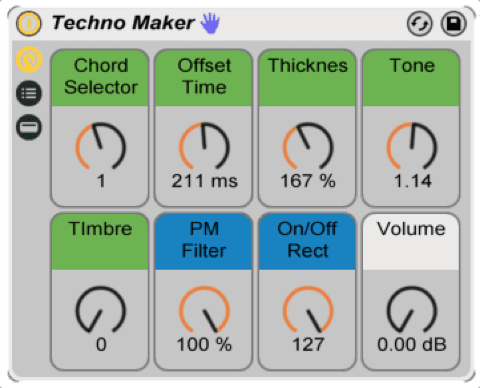
Hear it in action
Shape chords from your kick
01
Chord Selector
Switch between Cm9, Gm9, Ab9, and Eb9 chords.
02
Time Offset
Change the timing of the chords.
03
Thickness
Adjust the thickness of the sound.
04
Tone
Explore changes in chord tone and color.
05
Timbre
Change the number of bandpass filters used by the vocoders.
06
PM Filter
Create a low-pass-like sound using Corpus.
07
On/Off Rec
Explore different rectifier positions.
08
Volume
Adjust the output level.
Before you download
- Ableton Live Suite 9.6.1 or later.
Ableton Live and any separately required third-party software are not included.
Install in Live
- Install any required packs or plug-ins listed here first.
- Double-click the downloaded rack file to open it in Ableton Live.
- Click the rack’s Save button to keep it in your User Library.
- Load the rack on a return track and turn up the corresponding send on your kick track.
Get Techno Maker
See the current price and download options on Gumroad.
Very cool
that is super