

Side Brain / Audio Effect Rack
Vocal EQer
Add warmth, air, and clarity to a vocal, or reduce rumble and harshness. Eight macros put the useful EQ moves within easy reach.
An Ableton Live installation that includes EQ Eight. View requirements ↓
Looking for more tools? Explore Composition Power Tools ↗
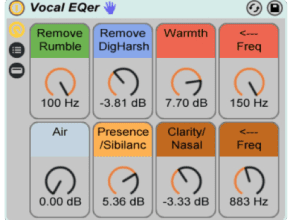
Eight ways to shape a vocal
Remove Rumble
Reduce low frequencies below 100 Hz.
Remove DigHarsh
Reduce harshness around 3 kHz.
Warmth
Add body around 100–150 Hz.
Warmth Frequency
Adjust the frequency of the warmth boost.
Air
Add a high shelf around 12 kHz.
Presence/Sibilance
Boost presence or reduce sibilance around 4 kHz.
Clarity/Nasal
Add clarity or reduce a nasal tone around 900 Hz.
Clarity/Nasal Frequency
Adjust the frequency targeted by the Clarity/Nasal control.
Inside the rack
Vocal EQer uses one EQ Eight in oversampling mode. Open the rack to inspect the frequency settings.
Before you download
- An Ableton Live installation that includes EQ Eight.
- Check the download's compatibility with your Live version before purchasing; the original page does not specify a minimum version.
Ableton Live and any separately required third-party software are not included.
Install in Live
- Install any required packs or plug-ins listed here first.
- Double-click the downloaded rack file to open it in Ableton Live.
- Click the rack’s Save button to keep it in your User Library.
Get Vocal EQer
See the current price and download options on Gumroad.
THIS IS EVERYTHING! Love it!!!!! just purchased it!
Thank you!
Where are these adg files placed in Live? They don’t appear in the browser; can they be relocated to appear in Live’s audio effects?
Open them up in Ableton and click the small disk icon on the top right of the device to save it to your user library.
I need this software